


World TV - All TV Channels
4.33.00 Reviews
App Specs
- Version
- 1.0.1
- Updated On
- License
- Free
- Downloads
- 10,000+
- Developer
- DiabloDevs
- Categories
- Events
- Platform
- Android
Screenshots
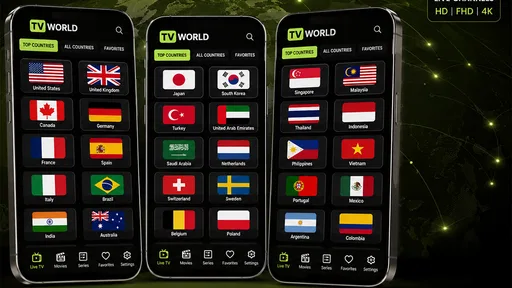
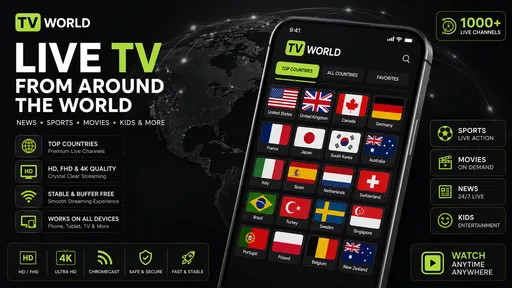
 Analysis by AppCompare
I like the idea behind World TV - All TV Channels: bring public IPTV playlists and videos you already own into one place, rather than making you jump between a conventional live-TV guide and a separate video player. That makes it a practical option for people who already know where their streams come from and want a straightforward way to watch them on a mobile device. It is less suited to someone expecting a polished, all-inclusive television service with a guaranteed channel lineup.
Free access changes the value calculation
The app is free to download, so trying it does not require a purchase. That is useful when you are deciding whether a playlist-based viewing setup fits your habits, especially if you already have public IPTV playlist sources or personal video files. I would think of the free price as removing the upfront cost, not as a promise that every channel or stream will work.
World TV is an events-category app from DiabloDevs, although its purpose is viewing rather than planning or attending events. It has a 4.3 average from around 460 ratings, with more than 10,000 installs. Those figures suggest that people are using it, but they cannot tell you whether a particular playlist is reliable or whether its available streams suit your region.
The app is rated for Everyone and is currently at version 1.0.1. It runs on Android 7.0 or later, which makes compatibility an important first check if you are setting it up on an older phone or tablet. Since there is no purchase to weigh against a specific feature set, the useful question is whether its flexible playlist-and-video approach saves you enough hassle to keep using it.
What the app’s approach does well
Rather than treating television as a fixed package, World TV centers the viewing experience on public IPTV playlists and your own videos. That distinction matters. With a traditional live-TV service, the provider usually decides the channel selection and organizes the guide. Here, the source playlist is central: what you can watch depends on what it contains and whether its streams are accessible.
That flexibility can be valuable for someone who follows local broadcasts, international programming, or a mix of both through playlists they have chosen. It also gives personal videos a place alongside live streams, which may be convenient if you prefer one viewing app instead of switching between tools. I would not assume that this means the app supplies a curated catalog; the practical value is in playing sources you bring to it.
A useful way to approach setup is to test with a small, known-good playlist first, rather than importing several sources at once. If a channel fails, that makes it easier to distinguish a problem with that stream from a broader setup issue. Keeping a separate note of which playlists are dependable can also save time later, especially if you use the app for a specific local program or recurring event.
Worth Reading Before You Choose

Flipboard Shows What News Apps Must Do Beyond the Feed

Switching to Android Auto Means Rethinking Your Driving Routine

Google Calendar Makes a Crowded Week Easier to Manage

Ludo King Makes the Most of the Minutes Between Plans

Baby Panda World Brings Quick Play to Modern Phones, but Its Game Library Feels Busy

ESPN’s Live Game View Makes Following Close Games Easier
For personal videos, the same deliberate approach helps: try a file you already know plays correctly before relying on the app for a longer watch. That gives you a quick sense of whether your own video workflow is comfortable, without confusing a file-format problem with a live-stream problem. These are modest habits, but they make a playlist-based app easier to evaluate fairly.
Where the tradeoffs show up
The main compromise is that playlist flexibility transfers some responsibility to you. A public playlist can change, contain unavailable channels, or behave differently depending on the stream source. When a channel does not play, the cause may be the playlist or stream rather than the viewing app. If you want someone else to maintain a stable lineup and handle support, a conventional subscription service is likely the less demanding choice.
There is also a difference between having access to a playlist and having a dependable TV experience. A list can look promising but still include dead entries, inconsistent streams, or channels that are not useful to you. I would avoid building an evening plan around an unfamiliar source until you have tried it. For a live match, news broadcast, or scheduled event, testing the relevant channel beforehand is a sensible precaution.
Compared with a standard video-on-demand app, World TV is a different kind of tool. On-demand services are usually easier when you want to browse a managed library and press play without thinking about sources. World TV’s appeal is more about bringing compatible public playlists and your own videos together. If you do not already have sources in mind, that flexibility may feel like extra work rather than a benefit.
It is worth keeping expectations realistic about the word “global.” A playlist-based setup can make international and local streams reachable, but the app’s usefulness still depends on the content and availability of the playlists you use. I would not choose it on the assumption that every region, language, or channel is represented in a consistent catalog.
Everyday situations where it makes sense
Imagine you are staying with family and want to check a local broadcast while also having a personal video ready for later. If you have a suitable playlist and the stream works, using one app for both jobs could be simpler than switching between a live-TV player and a file player. The benefit is convenience, not a guarantee that every stream will load on every connection.
It can also suit someone who likes exploring public channels from different places but is comfortable doing a little preparation. I would save the playlist source that works well, try important channels in advance, and keep a backup viewing option for time-sensitive broadcasts. That small amount of planning is the difference between enjoying the flexibility and feeling let down by it.
For a household, the right fit depends on who will maintain the sources. A technically confident person may be happy to choose playlists and troubleshoot an occasional failure. Someone who just wants to hand a remote to a relative and know that familiar channels will always be there may prefer a managed TV provider. The app’s free access is appealing, but it does not remove the effort associated with playlist-based viewing.
Who is likely to get the most from it?
I would recommend giving World TV a try if you already use public IPTV playlists, want to watch a mixture of local and international streams, or would like a single place for those streams and your own videos. It is also a reasonable experiment for viewers who are patient enough to test sources rather than expecting an instant, curated lineup.
I would skip it if your priority is a guaranteed channel package, a carefully organized program guide, or customer support for every broadcast issue. It is also not the obvious pick if you only watch subscription-library films and shows; a dedicated on-demand app will generally make that routine simpler. And if you rely on one particular live event, do not make this your only option until you have confirmed that your chosen stream works reliably.
One practical decision point is whether you have a source ready. If you do, the no-cost download makes a trial straightforward. If you do not, first consider whether you want to find and manage playlists at all. The app’s central idea rewards users who value choice and are willing to take responsibility for their viewing sources; it is less compelling for anyone who wants television to work with no setup.
My verdict on the free download
World TV - All TV Channels offers a useful, specific kind of convenience: it brings public IPTV playlists and personal videos into a mobile viewing option without an upfront purchase. I appreciate that this can serve both live-stream watchers and people who want their own videos nearby. Its value is strongest when you already know which sources you want to use and can tolerate occasional playlist-related friction.
My recommendation is to try it as a flexible player, not to treat it as a replacement for a dependable paid television package. Start with one playlist and one familiar video, test anything important ahead of time, and judge it by how well your own sources behave. If that workflow feels easy, the free access may be enough to make it worthwhile. If you want a stable, curated lineup with minimal maintenance, a conventional TV or streaming service is the better fit.
A sensible first-session routine
When I try a player built around outside playlists, I separate the first session into two small checks. I would begin with a familiar video, then move on to a playlist whose source I already trust. This keeps the test focused: if the video works but one channel does not, I can investigate the playlist rather than assuming the whole app is at fault. It also prevents a messy first impression caused by testing several unknown sources at once.
For a channel I care about, I would check it at the time I expect to watch, not just briefly during setup. A stream that starts once may not be the one I rely on for a scheduled broadcast later. If the app is going to be used on a commute or while travelling, I would test on the kind of connection I expect to have there; the source and connection both affect the result. That is a practical safeguard, not a reason to expect the app to repair an unavailable stream.
What to expect from the viewing experience
A common question is whether downloading the app means the channels are ready to watch. I would approach it as a player for sources, not as a promise of a ready-made channel bundle. Have a playlist in mind before deciding whether its workflow suits you. If you want to browse a supplied catalog immediately, the usual managed live-TV or on-demand alternatives are likely more satisfying.
Another useful distinction is between keeping personal videos close at hand and replacing a dedicated media library. The app’s stated role includes your own videos, which makes one-place viewing appealing, but I would test the specific files you plan to use rather than assuming every file will behave identically. If your main goal is organizing a large collection, a specialist library app may be a better fit; if you mainly want a video available alongside streams, this combined approach could be enough.
For shared viewing, I would decide who is responsible for maintaining the playlist before making it the household’s default. One person who understands the sources can handle changes and keep a backup choice ready; without that person, occasional broken entries may become confusing for everyone else. This is a small but important trade-off: flexibility is valuable when someone is willing to manage it, while a fixed provider is easier when several people simply want to turn on familiar channels.
Where I would draw the line
The app is not my first choice for a must-not-miss broadcast unless I have already tested the exact stream. That applies to a major news moment, a live sports event, or anything with a fixed start time: the cost of discovering a playlist problem at the last minute is greater than the convenience of having everything in one player. I would keep another legitimate viewing option available for those occasions.
It is also a poor match for someone who does not want to think about sources, stream availability, or basic troubleshooting. Free access lowers the barrier to trying it, but it does not make playlist upkeep disappear. On the other hand, for a curious viewer who already collects suitable sources, the chance to bring live streams and personal files together may justify that small amount of attention.
In short, I see the strongest value here as control rather than certainty. You choose the sources and decide whether the combination works for your routine. If you value a maintained lineup and an effortless guide more than that control, I would spend my time with a conventional television service instead. If you are comfortable testing your own sources, World TV is a sensible free experiment, with realistic expectations about what a player can and cannot guarantee.
Pros
- Browse a broad selection of TV channels in one place.
- Simple layout makes channel discovery straightforward.
- Useful for viewers who enjoy exploring international programming.
- Convenient alternative to switching between multiple channel apps.
- Available at no cost to download.
Cons
- Channel availability may vary by country or change over time.
- Some streams may be unavailable or stop working unexpectedly.
- Video quality can depend heavily on your internet connection.
- Ads may interrupt browsing or viewing.
- Some channels may require external players or additional apps.
FAQs for World TV - All TV Channels
What is World TV - All TV Channels?
World TV - All TV Channels is an app intended to help users find television channels from different countries in one place. The channels and viewing options available may vary by region, device, and app version. Before downloading, check the app listing for current details about its content, supported languages, and whether it provides live streams, channel guides, or links to external services.
Can I watch every listed TV channel live for free?
The word “All” in the title does not guarantee that every channel is available or that every stream is free. Access can depend on licensing, location, and whether a broadcaster makes its content available online. Some listings may open an external website or service, and streams may be unavailable or require a subscription. Review the app’s description and any access terms before relying on it.
Is World TV - All TV Channels available on Android and iOS?
Availability can differ between platforms, countries, and app-store regions, so check the official Google Play Store or Apple App Store listing for your device before downloading. Confirm the developer name, supported operating-system version, recent update date, and listed permissions. If the app does not appear in your store, it may not be offered for your region or device; avoid unofficial download sites.
Does the app require an internet connection, and how much data might it use?
Watching television streams generally requires an internet connection, and video can use substantially more data than browsing channel names or schedules. Consumption depends on stream quality, viewing time, and whether playback uses Wi-Fi or mobile data. If your plan has a data cap, connect to Wi-Fi when possible and check your device’s data-usage settings. Availability and playback quality may also vary with connection speed.
Is World TV - All TV Channels safe, and what permissions should I review?
Download the app only from an official app store, then review its developer information, privacy policy, ratings, and requested permissions. Permissions should make sense for the features you use; be cautious if an app requests access unrelated to television viewing. A store listing alone cannot guarantee privacy or uninterrupted service, so check how data is handled and whether the app links to third-party sites before sharing personal information.


